Wolf Grounds
Install Wolf Grounds Tap Share › View More › "Add to Home Screen"
Wolf Grounds — PUBG Discord Bot | Stats, Live Alerts & VODs
Fetching intel…
Live now
● Checking…

The PUBG bot your server actually needs.

Wolf Grounds delivers match stats, kill highlights, VOD clips, and live stream alerts directly in Discord — built for PUBG communities that care about signal over noise.

Free, and removable anytime. Asks only to read and send messages, embed links, and add slash commands. Or join the Wolf Grounds community →

⚡ 2-minute setup 🌐 Multi-guild 🤖 AI-powered
Live · tracked community data
Players
—
Total kills
—
Headshot %
—
Longest shot
—
Live
Mode —
Map —
Squad —
Kills —
Players —
Wolf Reports

Watch the kill, not a screenshot of it.

Wolf Grounds matches PUBG kill telemetry to the streamer's VOD and cuts straight to the second it happened. These are real reports from the last 30 days — press play.

— → —
Weapon
—
Map
—
POV
—
Recent reports 8 with VOD
In Discord

Clean embeds. Real data.

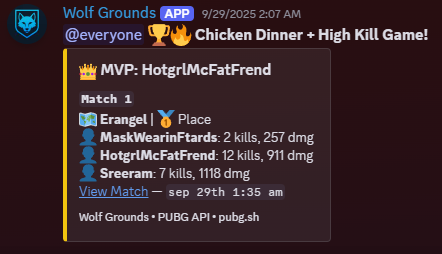
Every embed is designed to be readable at a glance — wins, kill highlights, VOD links, and weekly digests all on brand.
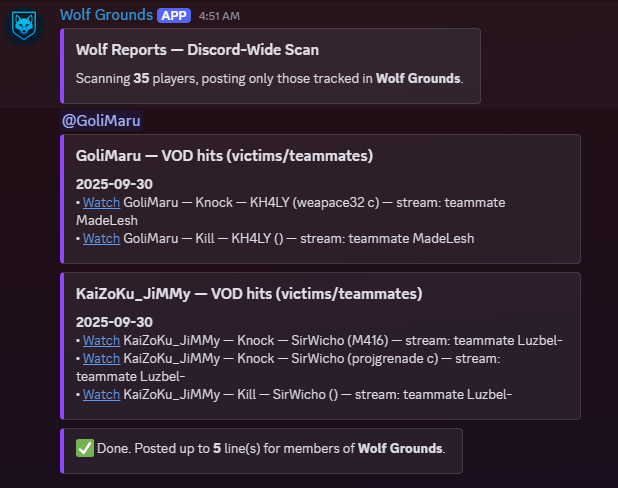
A Wolf Report embed in Discord, showing a kill highlight with the player's stats and a linked Twitch VOD. Wolf Report · kill highlight + VOD
A Chicken Dinner recap embed in Discord, summarising the winning squad's kills and placement. Chicken Dinner · squad recap
🎥 POV 1
🎥 POV 2
Dual-View Clips

Two POVs.
One moment.

Watch the killer and the victim's Twitch VODs side-by-side, locked in sync. Drift correction keeps them within ±0.4 seconds automatically.

⌨ Hotkeys: [ ] left  ·  ; ' right 🔒 Auto drift lock ±0.4s 🎥 Any Twitch VOD pair
Open Dual View ↗
Features

Everything your PUBG server needs.

Zero-drama setup. Wolf Grounds handles stats, highlights, stream alerts, and weekly digests so your community stays on top of the action.

The one people add it for

Stats & KD Trends

Per-player stats filtered by mode, match history, win recaps, and KD trend graphs over time.

Nobody else does this

VOD Highlights

Correlate PUBG kill telemetry to streamer VODs. Wolf Reports, Clips, and Dual-POV links all included.

Leaderboards Per-mode leaderboards (Solo/Duo/Squad, FPP/TPP) with minimum game filters and clean Discord embeds.
Live Stream Alerts Auto-post Twitch lives with smart de-dupe and per-channel routing. Link PUBG names to Twitch logins.
AI Ask Ask about your server's stats, weapon mastery, telemetry, and match history in plain English — on Discord or the web.
Weapon Mastery Top weapons, damage output, kills, and mastery level per player pulled straight from PUBG's API.
Looking For Group Create LFG posts with join/leave buttons, private voice channels, and a live active-player feed.
Challenges & Goals 7-day head-to-head stat duels between players, plus server-wide community goals tracked across the whole roster.
Progress & Recaps Week-over-week stat trends and AI-generated season recaps built from your full telemetry history.
Multi-Guild Ready Each Discord server keeps its own roster, stream subs, goals, and settings independently.
Slash Commands

Pull any stat instantly.

No dashboard required. Every feature is a slash command away in Discord.

/stats player Detailed stats for any player, filtered by mode (Solo/Duo/Squad, FPP/TPP).
/stats leaderboard Server leaderboard ranked by KD, damage, or wins with a minimum-games filter.
/stats kd KD trend graph over the last N matches for a player.
/stats weapon Weapon mastery breakdown — top guns, damage, kills, and mastery level.
/stats wins Recap of a player's last 5 chicken dinners with match details.
/stats funfacts Post 5 fun stat leaderboards from the server roster.
/wolf report Your Wolf Reports — kill and knock highlights tied to streamer VODs.
/wolf clips Your Wolf Clips — streamer-POV kill highlights with dual-POV links.
/wolf card Generate a shareable player card image with your current season stats.
/wolf progress Week-over-week stat trends showing how your numbers have moved.
/wolf challenge Challenge another player to a 7-day stat duel and track it live.
/wolf set-goal Set a community stat goal for the whole server roster to chase.
/wolf match-night Schedule a community match night and let the bot notify the server.
/wolf season-recap AI-generated season recap built from your full telemetry history.
/discord lfg Create a Looking For Group post with join buttons and a private voice channel.
/discord join Add a PUBG name to this server's tracked roster.
/twitch add Subscribe a Twitch streamer for live alerts in this server.
/twitch spotlight Highlight the server's top PUBG streamer from recent Wolf Clips.
/help Show all commands and how to use the Wolf Bot AI assistant.
Free to add

Ready to level up your PUBG Discord?

Two-minute setup. No credit card. Free for up to 10 players.

⚡ Add Wolf Grounds to Discord ❤ Get a membership
FAQ

Common questions

Yes. Wolf Grounds uses public PUBG APIs and respects all rate limits and terms of service. No game mods, no cheats — just data.
Wolf Grounds de-duplicates live alerts, combines high-kill posts, and keeps every embed concise. Less spam, more signal.
Yes. Each guild gets its own roster, settings, and stream subscriptions. Nothing bleeds between servers.
Server admins can manage settings, rosters and Twitch links from the web dashboard today. CSV export is next on the roadmap, and a public API is planned for later.
Yes — Wolf Grounds is free to add, and the free tier stays free: up to 10 rostered players, stat lookups, leaderboards, and 2 AI questions a day. Memberships from $1.99/mo raise the roster cap and add automatic match posts, Twitch alerts, and Wolf Reports.
Add Wolf Grounds to your Discord server in two minutes — just click "Add to Discord" and follow the prompts. Then use /discord join to add players to your roster.
Roadmap

Where we're headed.

What's shipping now, what's next, and what's further out.

Now
Mobile site polish
Command polish & bug fixes
Performance passes
Later
Public API
Cross-game expansions
ML-powered highlights
Changelog

Latest updates

Week of Sep 21, 2026
This week Wolf Bot got a complete glow-up—faster, smarter, more reliable, and packed with stats that actually tell your story. 🐺⚡
Bug Fix Mentioning Wolf Bot is more reliable — if Discord briefly drops the connection, the bot now retries instead of leaving you with no reply. Also fixed garbled symbols showing up in some Wolf Bot error and cooldown messages.
Bug Fix Subscribing to Wolf Grounds now gives you your tier role (Recruit, Packmate or Pack Leader) in the Wolf Grounds Discord right away. If you subscribed before joining the server, you'll get it when you join. Upgrading swaps your role automatically. Anyone who subscribed recently and didn't get a role will have it shortly.
Bug Fix Clan names and tags now show on player profiles on the website where they were missing. Also fixed a bug that reset a player's stat history when two servers had added them with different capitalisation.
Bug Fix Wolf AI no longer treats the M416 and HK416 as two different guns — they're the same weapon, and it was splitting your stats between them and giving contradictory advice. Weapon skins now count toward the right gun too, so your usage numbers are accurate.
Bug Fix Numbered lists in Ask AI answers now count properly. Some answers were showing "1." on every point instead of 1, 2, 3, 4.
Bug Fix Longest Kill on the website now shows a clean distance like "245m" instead of long decimals like "245.253m" on the Seasonal, Lifetime and Match History tabs.
Bug Fix The Wolf Reports player on the homepage no longer shows a "Dual POV" button on clips that don't have a second viewpoint. The button now only appears when there's a dual view to open.
Bug Fix Wolf AI now uses in-game weapon names in its answers, such as M416 instead of "HK416", SLR instead of "FN FAL" and S686 instead of "Beretta". Each gun also shows up under one name, so your recent-match and lifetime weapon stats match.
Bug Fix Community goals now count only your own server's players. Before, games from every server using Wolf Grounds counted toward every server's goal.
Bug Fix The profile menu in the top-right corner works again on the Discords page. Clicking your name there now opens your menu like it does everywhere else on the site.
Bug Fix Rank badges now show up for everyone. Players who haven't played ranked this season were missing the badge beside their name entirely — they now get their Survival Mastery badge instead.
Bug Fix Fixed the FAQ on the home page — answers were leaking a sliver of text under every question instead of staying closed. They now open and close cleanly.
Bug Fix Match cards on the Feeds, Reports and Stats pages now show the proper Paramo map art and map name instead of a blank tile labelled "Chimera_Main". Any future map we haven't added art for yet will also fall back to a clean gradient instead of an empty box.
Bug Fix The live community stats on the mobile home page — players tracked, total kills, headshot %, longest shot — were invisible on every phone. They're back.
Bug Fix Fixed the home page scrolling sideways on phones. The top bar was wider than the screen, especially when signed in with a longer name.
Bug Fix On iPhone, tapping the player search or any form field zoomed the page in and wouldn't zoom back out. Fixed.
Improvement Clan pages now show each member's Discord servers as small server icons instead of a text label. Hover an icon to see the server's name.
Improvement Tap any match in your Match History to see the full story: your squad's stats, a timeline of the match, every elimination with weapon and distance, who took you out, your drop and route on the map, and a breakdown of every fight. Kill lists now show all your kills too, including knocked players who bled out or went down when their squad was wiped.
Improvement The Weapons tab got a big upgrade: see your signature weapon, how your kills split across weapon classes, your mastery level and tier, knocks and best game for every gun, normal vs ranked side by side, and where you rank in your clan and across Wolf Grounds. Weapon stats now stay up to date instead of showing old numbers.
Improvement Ask AI on the website is now a real conversation. Ask a follow-up and it remembers what you just talked about, your earlier answers stay on screen, and a counter shows how many AI questions you have left today. Answers also look better, with proper stat tables, a copy button and a quick link to the player's full stats.
Improvement The Player box on the Ask AI page now suggests tracked player names as you type, just like the Stats search. Pick a name with a click or the arrow keys and it takes you straight to your question.
Improvement The player search on the Wolf Grounds homepage now suggests names from your very first keystroke, and it keeps working if the site has a brief hiccup instead of showing "No players found" until you reload.
Improvement Player profile cards on wolfgrounds.com look cleaner on phones. The avatar, name, membership badges and stats are now centered instead of pushed to one side, and long player names no longer get cut in half.
Improvement The Ask AI page looks tidier. The chat box and the info panel beside it are now the same height, and the question box sits at the bottom where you'd expect it.
Improvement Season recaps and the weekly digest now label their numbers as "tracked games" (the wins and big games the bot posted), so they no longer show a misleading win rate or per-match average.
Improvement The home page now shows the two most recent weekly update round-ups instead of every one ever posted, with a link to the new Changelog page where you can read the full history week by week.
Improvement The Wolf Reports list on phones no longer traps your scroll. Swiping anywhere now scrolls the page, and there's a "show more" button for the rest of the reports.
Improvement Tapping a live streamer on your phone now opens the stream at a proper size instead of a tiny letterboxed window.
Announcement The roadmap on wolfgrounds.com has been refreshed. The web dashboard is live, so server admins can manage settings, rosters and Twitch links from the website. Next up: map and mode filters for Wolf Reports, clip packs, and CSV stats export.
Performance Behind-the-scenes speed-up: we switched off a diagnostic setting that was slowing down every bot action, so commands and match posts respond more quickly when the bot is busy.
Performance The website now uses much less of the database the bot also relies on, so busy moments on the site are less likely to slow down or knock out the Discord bot. Player, clan and leaderboard lists also keep working if the database has a brief hiccup.
Performance Coming back to the website is faster. Pages you've already visited reuse what your browser saved, and the FAQ, Terms and Privacy pages only reload when something has actually changed.
Performance Asking Wolf AI about your recent matches on the website is faster, because it no longer waits on downloads it didn't need.
Performance Player profiles load faster. A player's clan tag and name now show up almost instantly instead of popping in last, and the rest of the profile and clan pages no longer load one piece at a time.
Performance The rank badge beside a player's name appears much faster, and is instant when you revisit a profile or open one in a new tab.
Performance The home page loads faster and uses less battery on phones. The background image is now a fifth of the size on mobile, and the animated hero effects no longer run on small screens.
Week of Sep 14, 2026
Your stats just got real, your wins are finally trackable, and PUBG news hits different. Wolf Grounds leveled up. 🎯
Improvement PUBG news posts now arrive as a clean embed — headline links straight to the official article, with the article's artwork and a timestamp, instead of a wall of text and a raw link.
Improvement The "Last 6 / Last 7 days / Last 20" buttons on your Recent Chicken Dinners and Recent High Kill Games now actually work. They used to only look at games the bot had posted about, which meant there were rarely enough to tell the options apart. They now pull from your full recent match history, so you'll see more of your wins and big-kill games, and switching between the options is instant.
Bug Fix Fixed the Bot Kills stat on player pages showing a dash instead of your total, and fixed the site sometimes serving hours-old stats on one device while another showed current numbers.
Bug Fix Fixed the Skill Grade badge disappearing from player profiles — it now shows consistently instead of only when the page happened to load fresh stats.
Bug Fix PUBG news posts in <#1417360481873825802> now show as a clean card: the headline links straight to the article, the official artwork is included, and the extra link preview underneath is gone.
Bug Fix News Day Tuesday is fixed — weekly update posts go out reliably again, even on big weeks, and the website changelog stays up to date.
See all 5 weeks of updates →
Stay updated

Get release notes

A short email each News Day Tuesday, only in weeks with updates. Unsubscribe anytime.

Contact

Get in touch

Questions, collabs, or feedback? Use the form or reach us directly.

📧 support@wolfgrounds.com Join the Wolf Grounds Discord ❤ Get a membership
● Live